Mission Lane
- 4.8
- Rating
- 1.00M
- Installs
- Free
- Price

 Analysis by App-foxy
Managing a credit card from a phone sounds simple, but the quality of the experience depends on whether the app helps me understand what is happening with my account instead of merely displaying a balance. Mission Lane is a finance app from Mission Lane, LLC built around that everyday task. I found it most useful as a mobile control panel for card activity: checking where I stand, reviewing purchases, and handling routine account management without reaching for a computer.
The app is free to download and is rated for Everyone, which makes the basic decision uncomplicated: there is no purchase price for getting the app itself. That does not turn the underlying credit-card relationship into a free financial product, of course. The sensible way to judge it is by asking whether its mobile access saves time and gives me enough visibility to manage a card responsibly. For people who already use Mission Lane, that answer is generally positive. For someone looking for a complete money-management system, the fit is narrower.
How Mission Lane works in everyday card management
Mission Lane presents itself as a focused finance tool rather than a broad budgeting suite. Its job is to put card information and account actions in one place on a phone. That focus is important. I would not open it expecting investment tracking, a full household budget, or a combined view of several unrelated banks. I would open it when I need to check my Mission Lane card and make a practical decision based on current account information.
You May Also Like

 Blood Strike: 2.5 Anniversary
Blood Strike’s Loadouts Turn Every Drop Into a Tactical Gamble
A close look at Blood Strike’s custom loadouts: how fast access to signature weapons reshapes its battle royale rhythm, rewards preparation, and narrows the gap between fights.

 Pandora - Music & Podcasts
Pandora’s Music Is Easy to Start, but Harder to Recover
Pandora’s strength is its low-effort path from a seed to a station. Its weak spot is how much confidence it asks you to place in connection, setup, and quiet recovery.

 8 Ball Pool
 Is Built on Rivalries, Rematches, and Routine
A close look at the rivalries, rematches, shared routines, and unanswered safety questions that turn a quick pool match into a persistent mobile community.

 Samsung Music
’s Quiet Strength Is Playing What You Already Own
Its reach comes less from spectacle than from dependable access to a personal library. That simplicity is both the app’s strongest retention engine and its ceiling.

 AccuWeather: Weather Radar
AccuWeather Review: A Quick, Clear Forecast for Everyday Decisions
For everyday plans, the best forecast is the one you can understand quickly. AccuWeather makes rain timing, radar, and local conditions easy to act on, with a few trade-offs.

 Hill Climb Racing
Why Hill Climb Racing Still Turns Crashes Into One More Run
A tiny car, a bumpy hill and one more upgrade: Hill Climb Racing keeps resurfacing because its simple chaos makes every near-miss feel personal.
More From Our News Desk



The app has been available since June 25, 2019, and the current version is 16.1.0. It supports Android 7.0 and later, so compatibility is relatively broad for people using older Android devices. Mission Lane has also built a substantial user base: the app has more than a million installs, with an average rating of 4.8 from roughly 183,000 ratings and about 9,600 written reviews. Those figures do not guarantee that every user will have the same experience, but they do suggest that the app has become a regular access point for many cardholders.
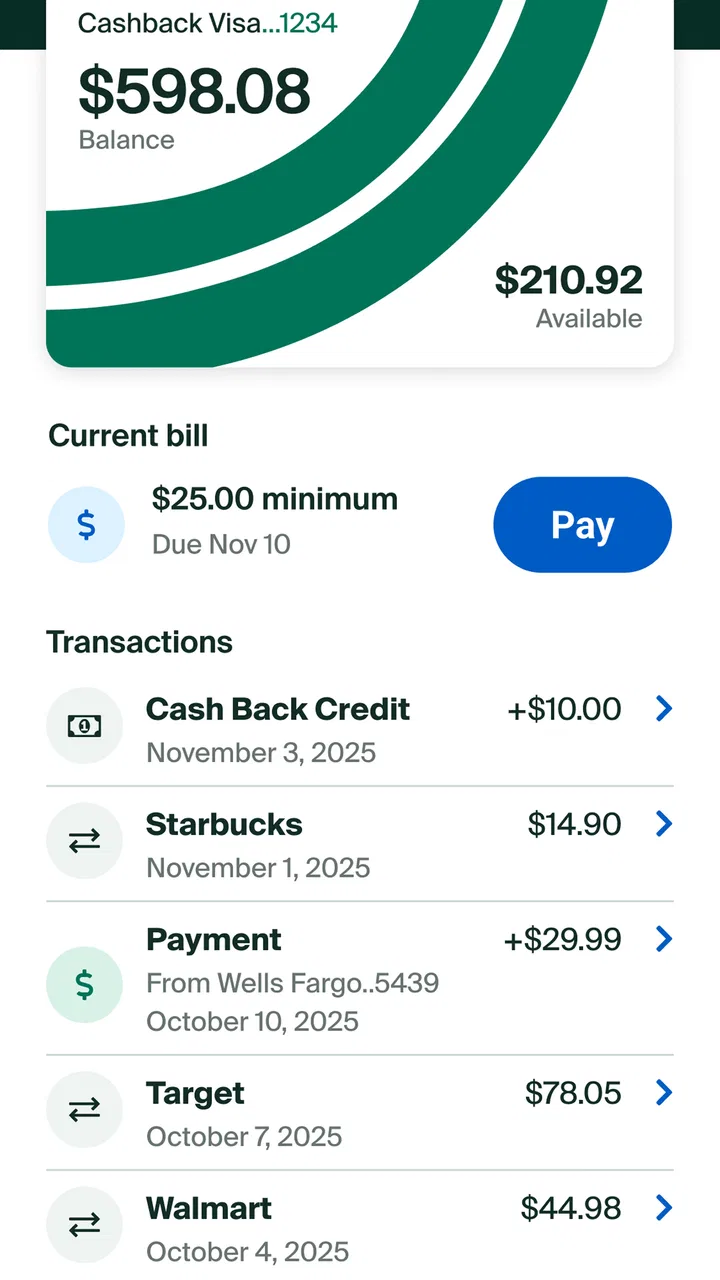
My first practical recommendation is to treat the app as a daily or weekly checkpoint, not as something to open only when a problem appears. A quick review after a few purchases can help me notice whether spending is moving faster than expected. That habit is more useful than simply checking the balance before a payment, because a balance alone does not explain which transactions created it or whether a purchase is still pending.
The useful workflow is review first, action second
A good mobile card routine starts with looking at recent activity before taking action. I would open Mission Lane, scan the latest transactions, and compare them with receipts or familiar spending patterns. If something looks unfamiliar, the important advantage is having the account information close at hand while the purchase is still fresh in my memory. That is a better workflow than waiting until a monthly statement forces me to reconstruct several weeks of spending.
This is also where a focused card app can be more convenient than a general banking app. A banking app may show multiple accounts, transfers, savings, and other products, but that extra breadth can make a single-card check slower. Mission Lane’s narrower purpose works in its favor when I want to answer one question quickly: what is happening with this card right now?
There is a useful distinction between convenience and financial insight. The app can make account access easier, but it does not replace the judgment needed to decide whether I can afford a purchase or whether I should reduce card use. I would use the information it provides as the starting point for those decisions, then keep a separate budget if I need category limits, savings goals, or a complete household picture.
A realistic use case: checking the card between errands
Imagine I have used the card for groceries, transportation, and a subscription during the same week. Before making another purchase, I can check Mission Lane from my phone rather than waiting until I am home. I can review the recent activity, see how the account has changed, and decide whether the next expense fits my plan. That small pause is especially valuable for people who tend to lose track of several small card purchases rather than one large transaction.
Another practical scenario is preparing for a payment. I would review the account before submitting anything, confirm that the recent activity makes sense, and make sure I am acting on the right information. The app’s value here is not that it makes the financial decision for me; it reduces the friction between noticing that I need to manage the account and actually checking it.
I also like the idea of using a consistent review moment, such as after payday or before a weekly grocery trip. That turns a finance app into part of a routine instead of a source of occasional anxiety. The trade-off is that the routine still depends on my discipline. No phone interface can prevent overspending if I never look at it.
What the free access really means
Mission Lane is free as an app, so I can install it without paying an app-store fee or buying an upgraded edition. That makes it easy to try for existing cardholders who want mobile access. The value comes from access and convenience rather than from a paid bundle of extra tools. In other words, I am not purchasing a premium budgeting platform; I am using a free companion for managing a Mission Lane card.
That distinction matters when comparing it with alternatives. A general banking app may also be free, while a dedicated budgeting service may offer free and paid tiers with broader planning tools. Mission Lane can be the better value if my main need is card access and account review. A wider financial app may deliver more value if I want one dashboard for several institutions, detailed spending categories, or long-term planning.
I would not judge the app by whether it eliminates every possible cost associated with using a credit card. The app price and the card’s financial terms are separate questions. Before relying on any card, I would read the account agreement and understand the applicable terms directly. The mobile app can help me manage the account, but it is not a substitute for knowing what the card itself costs or how its rules work.
Small habits that make the app more useful
The first habit I recommend is checking transactions before checking the total. A total can look familiar even when one individual purchase is not. Looking at the activity line by line gives me a better chance of catching an error, a forgotten subscription, or a purchase made by another household member.
The second is separating “available to spend” from “comfortable to spend.” Whatever account figure I see, I would compare it with money already reserved for rent, utilities, food, and other obligations. This is a non-obvious but important trade-off: a card interface can show account capacity, while my personal budget determines what is actually sensible.
The third is using the app as a record during conversations with support. If I need help with a transaction or account question, reviewing the relevant activity beforehand lets me describe the issue more clearly. I can note the merchant, date, and amount shown in the app rather than relying on memory. That preparation can make a support interaction less frustrating, even though the app itself does not replace human assistance.
A fourth useful habit is checking after a change in routine. If I start commuting more often, travel, move a subscription, or share spending with someone else, I would review the account more frequently for a while. The point is not to stare at the balance constantly; it is to use the app when my normal spending pattern has changed and my old expectations may no longer be reliable.
Where the focused design can feel limited
The same focus that makes Mission Lane straightforward can make it feel incomplete for people who want a broader financial command center. I would miss a unified view if I had several cards and bank accounts and wanted to compare them in one place. A dedicated budgeting app or a bank aggregator would be more suitable for that job, assuming I am comfortable connecting those accounts and using its approach to organizing data.
I would also avoid treating a card-management app as a replacement for a personal spreadsheet or budgeting system when my finances are complicated. Someone managing irregular freelance income, multiple debts, shared household expenses, and savings targets may need tools that organize cash flow across categories and time periods. Mission Lane’s value is strongest when the main object of attention is the Mission Lane card itself.
There can also be friction whenever mobile account access depends on sign-in details, device changes, or security checks. That is not a reason to dismiss the app; financial apps should protect access carefully. Still, I would keep my login information secure and avoid assuming that a phone makes every account task instant. If I am locked out or facing an account-specific issue, I may still need the official support route rather than expecting the app to solve everything.
Another limitation is psychological rather than technical. A convenient card app can encourage frequent checking without improving spending behavior. If I open it repeatedly for reassurance but do not set a spending plan, the extra visibility may not change my results. I get the most from Mission Lane when I connect each review to an action: verify a purchase, prepare for a payment, or decide not to make an unnecessary expense.
Who is likely to get the most value
Mission Lane is a good fit for an existing cardholder who wants a simple phone-based way to stay close to the account. It is especially practical for someone who prefers checking financial information in short sessions rather than sitting at a desktop. The free app access also lowers the barrier to trying it, provided the person already has a reason to manage a Mission Lane card.
I can also see value for people rebuilding their financial routines. A focused interface may be less intimidating than a large financial dashboard filled with accounts and charts. Reviewing activity regularly, matching purchases to a personal budget, and preparing for payments are manageable steps. The app does not do the discipline for me, but it can make the discipline easier to practice.
It is less suitable for someone who wants a single application for every financial product. If I need investments, detailed category reports, shared budgeting, debt projections, or a full net-worth view, I would choose a broader tool and perhaps keep Mission Lane installed only for direct card access. I would also skip it as a primary financial app if I do not use a Mission Lane card, because its focused purpose would not justify taking up space on my phone.
How it compares with the usual alternatives
Compared with a desktop account portal, the mobile app wins on immediacy. My phone is usually nearby, so checking activity becomes easier to fit into a normal day. The desktop option may still feel better for extended reading or handling several financial tasks at once, but I would choose Mission Lane for quick checks rather than long sessions.
Compared with a general bank app, Mission Lane offers a more specific destination for its card relationship. A bank app is more useful when I want transfers, checking accounts, savings, and credit products together. Mission Lane is more appealing when I do not want unrelated financial information competing with the card task I came to complete.
Compared with a budgeting app, the difference is purpose. Budgeting software helps me plan across income and expenses; Mission Lane helps me stay connected to one card account. I would not use the two as substitutes. In a careful setup, the budgeting tool defines my limits and the card app supplies a convenient place to review the card activity that must stay within those limits.
That comparison also explains why the high user rating should be interpreted in context. A strong rating can reflect that the app performs its focused job well, not that it offers every financial feature. If I want a direct card-management experience, that is encouraging. If I want a complete financial planner, I still need to judge the app against a different standard.
Device support and practical expectations
Android users on version 7.0 or newer can consider the app within its stated operating-system support. Before installing, I would still make sure the phone is updated as far as practical and that I can access the email or sign-in method connected with the account. Those simple preparations matter more for a finance app than they do for a casual game, because losing access at the wrong moment can be inconvenient.
The Everyone age rating makes the app broadly accessible from a content perspective. That should not be confused with financial independence for younger users: whether someone can hold or manage a particular card depends on the account relationship and applicable requirements. The rating describes the app’s content audience, not a promise that every person can open or use the underlying financial product.
I would also keep notifications purposeful if the app offers them on my device. Alerts can help me notice account activity, but too many interruptions can lead me to ignore the ones that matter. My preference would be to allow useful account-related notices while reviewing the phone’s notification settings periodically. This keeps the app in a supporting role rather than letting it become background noise.
My verdict on the value
After looking at the app as a practical finance companion, I see Mission Lane as a sensible free tool for people who already use the associated card and want direct mobile access. Its strongest quality is focus: it helps bring a specific card relationship into an everyday phone routine. The real benefit is not flashy financial analysis but the reduced effort required to inspect activity and make more informed account decisions.
The trade-off is equally clear. I would not install it expecting a complete budgeting system, a multi-bank dashboard, or a replacement for reading the card’s terms. People with broader financial needs will get more from a general banking or budgeting alternative, possibly alongside this app rather than instead of it.
My recommendation is to use Mission Lane when direct card management is the goal, and to pair it with a separate budget when spending control is the goal. That distinction keeps expectations realistic. The app is free, widely used, and supported on older Android versions, but its value depends on matching its focused purpose to the way I manage money.
For me, the buy-or-skip decision is straightforward: existing Mission Lane cardholders should try it because the app removes friction from routine account checks without an app purchase cost. People who do not have that card, or who need a complete view of their finances, should skip it as their main finance solution and choose a tool built for that wider job. Used within its proper limits, it is a practical, focused addition to a responsible card-management routine.
The app is developed by Mission Lane, LLC, and its store summary describes the central idea plainly: managing a credit card from a phone. My experience of its value comes from applying that idea realistically—not expecting it to manage my entire financial life, but using it as a convenient place to stay aware of one important account.
FAQs for Mission Lane
01What is Mission Lane and what does it offer?
Mission Lane is a financial services app designed to help users manage their finances more effectively. It offers features like credit monitoring, budgeting tools, and personalized financial insights. The app is user-friendly and provides a comprehensive overview of your financial health, making it easier to improve credit scores and manage expenses.
02How secure is the Mission Lane app?
Security is a top priority for Mission Lane. The app employs advanced encryption technologies to protect your personal and financial data. Regular security audits and updates ensure that your information remains safe. Users can also set up two-factor authentication for an additional layer of security, ensuring peace of mind when using the app.
03Is Mission Lane free to use, or are there any costs involved?
Mission Lane offers both free and premium features. The basic version is free and includes essential tools for managing your finances. However, for access to advanced features such as detailed credit reports or personalized financial coaching, a subscription may be required. Users can choose the plan that best fits their financial needs.
04Can Mission Lane help improve my credit score?
Yes, Mission Lane is designed to help users improve their credit scores. It provides insights and recommendations tailored to your financial situation, such as tips on timely bill payments and reducing debt. The app also offers credit monitoring, allowing you to track changes and understand factors impacting your credit score.
05What kind of customer support does Mission Lane offer?
Mission Lane provides robust customer support to assist users with any issues or questions. Support is available via email, phone, and in-app chat, ensuring you can get help when needed. The app also includes a comprehensive help center with FAQs and guides to assist users in navigating its features effectively.
Pros
- User-friendly interface simplifies navigation.
- Offers personalized financial insights.
- Real-time transaction alerts enhance security.
- No annual fees on most credit cards.
- Responsive customer support available 24/7.
Cons
- Limited card options compared to competitors.
- May have higher interest rates for some users.
- Rewards program could be more robust.
- No mobile check deposit feature.
- Requires good credit for best offers.

Mission Lane
Gallery